One admin task.
Off your plate.
A free, practical guide to your first useful workflow with Grok Bot. Get a checked first draft in about 30 minutes, including a 10-minute safety setup. Then spend another 60–90 minutes testing it before anything runs on a schedule. For sole traders and small teams in any country.
Free, or pay what you want. Enter your email at checkout to download. Grok Bot itself needs a paid plan.
The work gets done. The admin follows you home.
A small business can run on excellent work and still lose evenings to the same handful of small tasks. This guide starts with one of those tasks, not an imaginary AI organisation chart.
An unanswered enquiry. A cluttered inbox. A post you meant to write last Friday. Pick one.
- Customer enquiries
Prepare a useful reply without guessing prices or making commitments.
- Inbox and paperwork
Turn a handful of messages into an action list you can check.
- Marketing from completed work
Draft accurate updates from work you actually did.
See what the first task looks like.
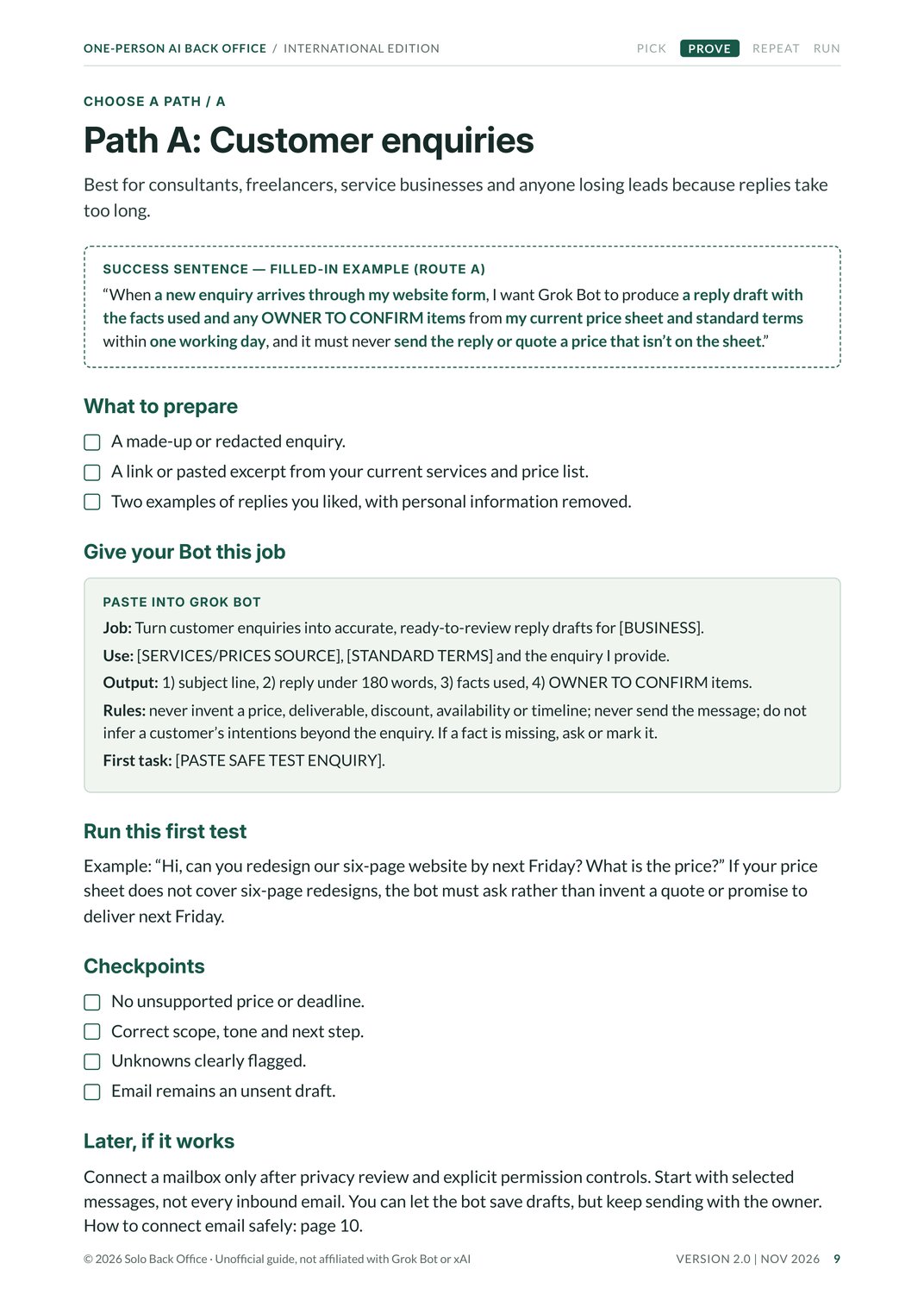
Choose one of three starting paths. The guide gives you the inputs to prepare, the instruction to paste into Grok Bot, and the checks that help you decide whether the result is safe to use.
01 / A safe test input
A customer asks for a quote.
“Can you redesign our six-page website by next Friday? What would it cost?”
Give the bot an example enquiry and your current service information. It should not promise a deadline or invent a price.
02 / What the bot should produce
SUBJECT   Re: Website redesign enquiry

DRAFT     A concise reply using verified service details.

CHECK     Price for six pages: not supplied.
CHECK     Friday delivery: not confirmed.

ACTION    Owner reviews and sends.
Illustrative format, not the result of a live bot run.
The first exercise uses example data. You don't need to connect a customer mailbox.
The first message, free to copy.
This is the starter message from page 7. Fill in the brackets and paste it into Grok Bot to brief your first assistant. The guide has a job instruction like this for each path, plus the tests to run on what comes back.
You are my AI back-office assistant for [BUSINESS NAME], a [SERVICE] business in [TOWN], [COUNTRY]. Our customers are [AUDIENCE]. We write in [TONE]. Use [APPROVED SOURCE] as the current source for services, prices and terms. If it is missing or conflicts with a message, flag the conflict and ask. Never invent prices, outcomes, availability, dates or customer commitments. You may research and draft; you may not send, post, buy, change records, or share files without my approval. Tell me what you understand and what you still need to know.
- It names your business and service correctly
- It knows what to ask rather than guess
- It can explain drafting versus sending
Useful before automated.
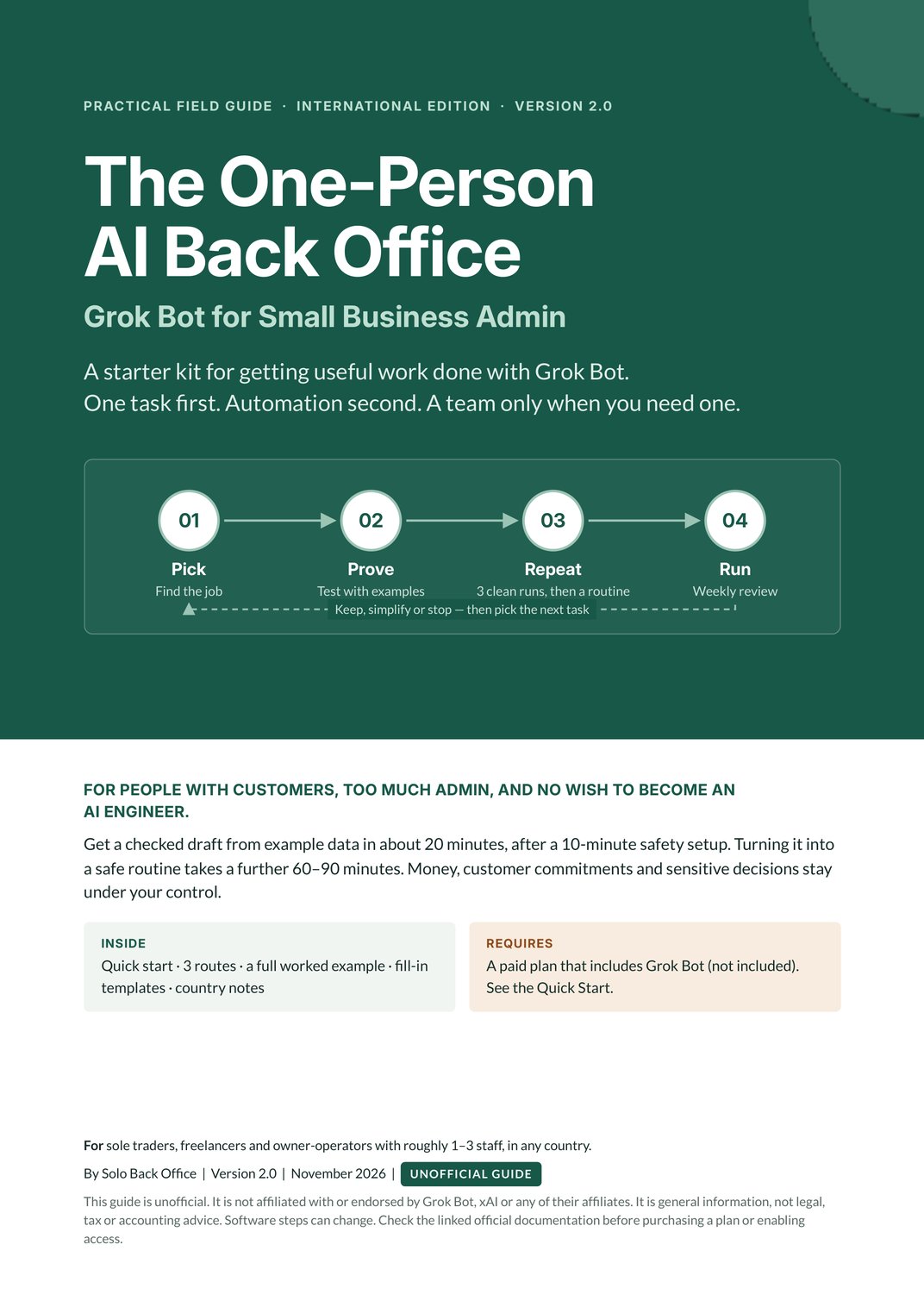
A workflow should earn the right to run on its own. The guide takes you through four milestones, with a pass test at each one.
Pick a worthwhile task.
A two-minute audit to find a frequent, low-risk job with a clear output.
Prove it with one draft.
A 10-minute safety setup, then about 20 minutes to a draft from example data. Check every price, date and promise.
Repeat it three times.
Three clean manual runs and a written runbook, then a routine you keep paused until you approve it.
Run it, and review it.
A five-minute weekly review. Keep it, simplify it, or switch it off if checking takes longer than doing it yourself.
Read the pages before you download.
These are images of the actual PDF. Pick a page, then open it larger to check the level of detail.
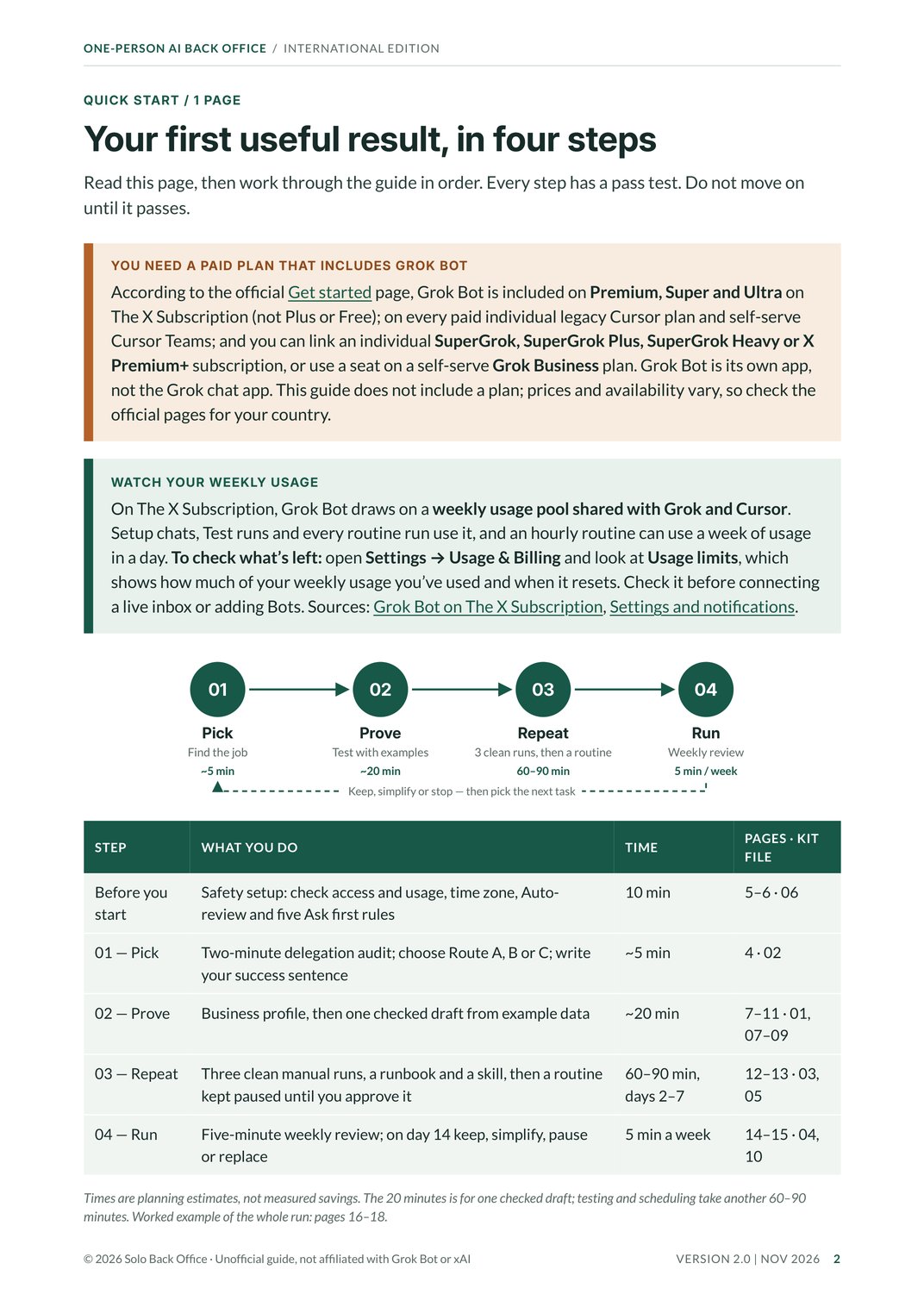
The full guide also covers the inbox digest and marketing paths, a 14-day operating plan, privacy and troubleshooting, an optional accountant-prep workflow and country notes.
What's in the download?
The 26-page PDF plus the free companion kit: 12 editable templates and a README, in plain text, Markdown and CSV. No special software needed.
Give the first task a proper system.
The guide, the working templates and the starter prompts, free. Grok Bot itself isn't included and needs a paid plan.
Enter your email at checkout to get the download. You'll also get a few short emails with tips on getting it working, and you can unsubscribe anytime. Requires a computer and a paid plan that includes Grok Bot. No business results are promised.
Written for people already running the business.
If you already have customers and repetitive work, there's something concrete to start with. This isn't a guide to finding your first customer, or a substitute for expert advice on regulated systems.
Start here if…
- You're a sole trader, freelancer or owner-operator with roughly 1–3 staff, in any country.
- You handle enquiries, admin or marketing yourself.
- You want to test a low-risk task before connecting live accounts.
- You're happy reviewing drafts and making the final call.
Pause if…
- You want an AI to make financial or customer commitments without your approval.
- You haven't made a first sale yet. Focus on customers first.
- You don't have a paid plan that includes Grok Bot.
- Your work involves regulated or highly sensitive data without a proper security review.
The practical questions.
No hype. A usable guide, a set of editable files, and a process you can check for yourself.
Do I need to know how to code?
No. You should be comfortable using a computer, copying instructions and reviewing the output. It's a practical guide, not a programming course.
Is Grok Bot included?
No. The guide is free, but Grok Bot needs a paid plan. Plans, prices and usage limits can change, so check the official FAQ for what's available in your country.
Why did my weekly usage run out so fast?
Setup questions, creating several bots, connecting a big inbox and test runs all draw on the same weekly allowance. The guide starts with one task and example data, and uses the least frequent schedule that still helps. If your usage looks far too small right after subscribing, your X, Cursor and Grok accounts may still be separate. Check the official X Subscription page before you unify them, because unifying accounts can't be undone.
Is it safe to connect my main email?
The guide has you set "Ask first" rules before granting any access, start with example data, and approve anything that sends, deletes or unsubscribes. You decide what it can touch.
Does it work outside New Zealand?
Yes. The method is the same everywhere. The country notes use New Zealand as a worked example and give official starting points for Australia, the UK, the US, Canada and the EU. Check tax and privacy rules for your own location.
What exactly will I receive?
A 26-page PDF guide and a ZIP with 12 editable templates and a README: business profile, task audit, three-run test log, time and value log, runbook, approval matrix, three path prompts, weekly review, accountant-prep pack and go-live checklist.
Why is it free?
Because the best way to see if this approach works for you is to try it. The guide and kit are complete on their own. If it helps, you can pay what you like.
What happens to my email?
You'll get the guide, plus a few short emails with tips on getting it working. One may mention our paid pack. You can unsubscribe anytime.
Will this definitely save me time?
That can't be guaranteed, so the guide doesn't promise a number. It gives you a before-and-after log to measure it yourself, including review and correction time, and tells you to stop if checking takes longer than doing it by hand.
Created by Solo Back Office as an independent, practical guide. Version 2.0, November 2026. Grok Bot features were checked against the official docs on 18 November 2026; software and plan terms can change, so use the current official documentation when you set up. Not affiliated with or endorsed by Grok Bot, xAI or their affiliates. General information, not legal, accounting, tax or security advice.